
Compute Costs
Masthead analyzes BigQuery compute resource consumption and provides recommendations based on the pipelines and resource usage patterns. These recommendations help leverage the most cost-effective BigQuery compute models.
Compute workload simulation
Section titled “Compute workload simulation”Switching BigQuery workloads between On-Demand billing and BigQuery Editions—or reconfiguring reservation slot pools—offers significant cost savings. However, migrating workloads without validating capacity requirements can lead to query queuing, SLA degradation, or unexpected costs.
To eliminate this uncertainty, Masthead runs discrete-event workload simulations using your historical query logs. The simulation models how queries would perform under virtual BigQuery capacity with varying editions and autoscaling boundaries before you apply any configuration changes.
Simulation inputs
Section titled “Simulation inputs”The simulation engine evaluates several dimensions of your historical BigQuery workload:
- Historical query execution telemetry: Analyzes query execution logs over a 30-day evaluation window, capturing slot millisecond consumption (
slot_ms), execution start and end timestamps, run durations, and concurrency peaks. - Workload taxonomy: Categorizes jobs into logical workload groups, including DAG models (individual dbt models and Dataform actions), scheduled pipeline jobs, projects, and IAM principals (user or service accounts).
- Target compute configurations: Evaluates candidate BigQuery editions (Standard, Enterprise, and Enterprise Plus), regional pricing, and slot configurations ranging from baseline allocations to dynamic autoscaling limits (
autoscale_max_slots). - Feature compatibility checks: Verifies that queries within a candidate workload don’t rely on features restricted by specific editions (such as customer-managed encryption keys, BI Engine, or continuous queries) to ensure seamless execution upon migration.
How the simulation evaluates workloads
Section titled “How the simulation evaluates workloads”Masthead reconstructs your workload timeline down to the second, simulating real-world execution conditions:
- Timeline replay: Replays past queries against a virtual reservation capacity pool.
- Concurrency and slot distribution: Models BigQuery’s fair-share slot scheduling and autoscaling behavior to distribute available slots among active jobs.
- Queue and latency tracking: Detects whether high concurrency periods exceed available slots, queues, and execution duration changes.
Simulation outputs and recommendations
Section titled “Simulation outputs and recommendations”The simulation generates actionable insights and sizing metrics to help you make informed decisions:
- Cost comparison and projected savings: Compares your actual 30-day compute expenditure against the simulated cost under the recommended compute model, quantifying net monthly savings.
- Recommended reservation capacity: Suggests the optimal autoscaling maximum slot size (
autoscale_max_slots) and baseline slot allocation to maximize cost efficiency while keeping query latency within acceptable thresholds. - Performance impact estimates: Provides expected duration percentiles (such as P95 execution duration) and peak queue statistics, confirming that performance remains stable under the recommended reservation size.
- Actionable implementation plan: Generates ready-to-apply configuration details, including SQL DDL statements to create or modify reservations, and tool-specific routing configurations (
RESERVATION_CONFIGfor dbt and Dataform, or principal assignment rules).
Recommendations
Section titled “Recommendations”Alternative compute models
Section titled “Alternative compute models”Masthead analyzes BigQuery compute resource consumption and provides recommendations for the most cost-effective BigQuery compute models.
See Reservation Assignments for detailed guidance.
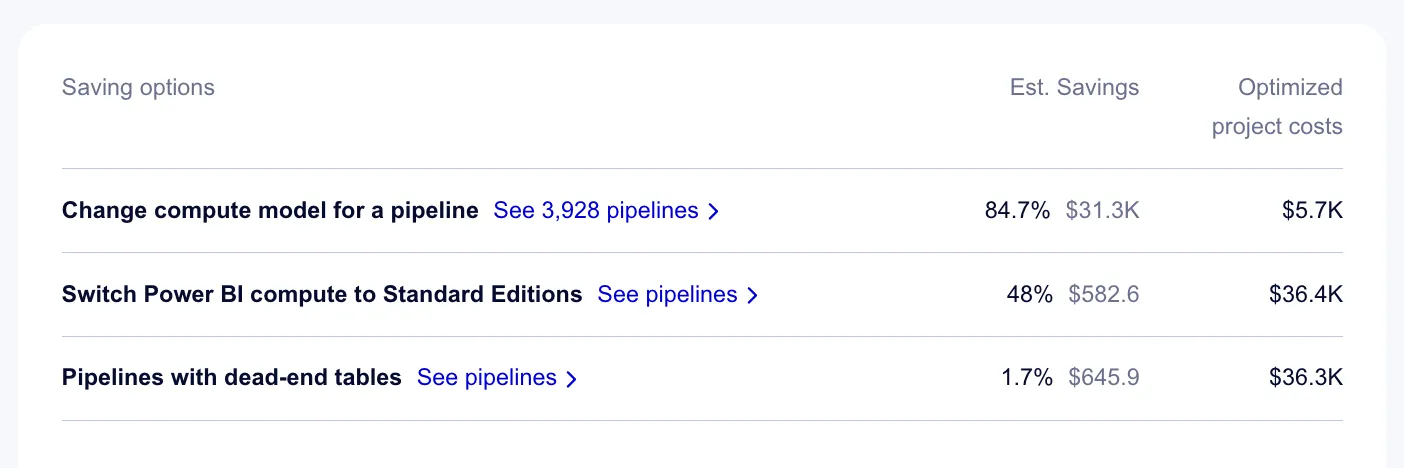
Pipelines with dead-end downstream
Section titled “Pipelines with dead-end downstream”Masthead identifies and tags tables with no downstream consumption as Dead-End Tables. This allows you to identify running upstream pipelines that only produce these tables. Review and reclaim resources by switching off such pipelines.
Recommendation:
-
Check recommendations for pipelines with dead-end tables on Costs Insights page:
.BZfzYmHA_4G6rc.webp)
Pipelines with dead-end tables -
Verify the tables have no consumers downstream on the Dictionary and Lineage pages.
-
Adjust or turn off upstream pipelines to reduce unnecessary compute spend.