
Run optimizations using a notebook
Use a notebook example to apply recommendations across all your datasets.
Masthead collects and analyzes BigQuery resource metadata and usage logs to estimate the cost for the data assets and shows the recommendations to optimize the spending.
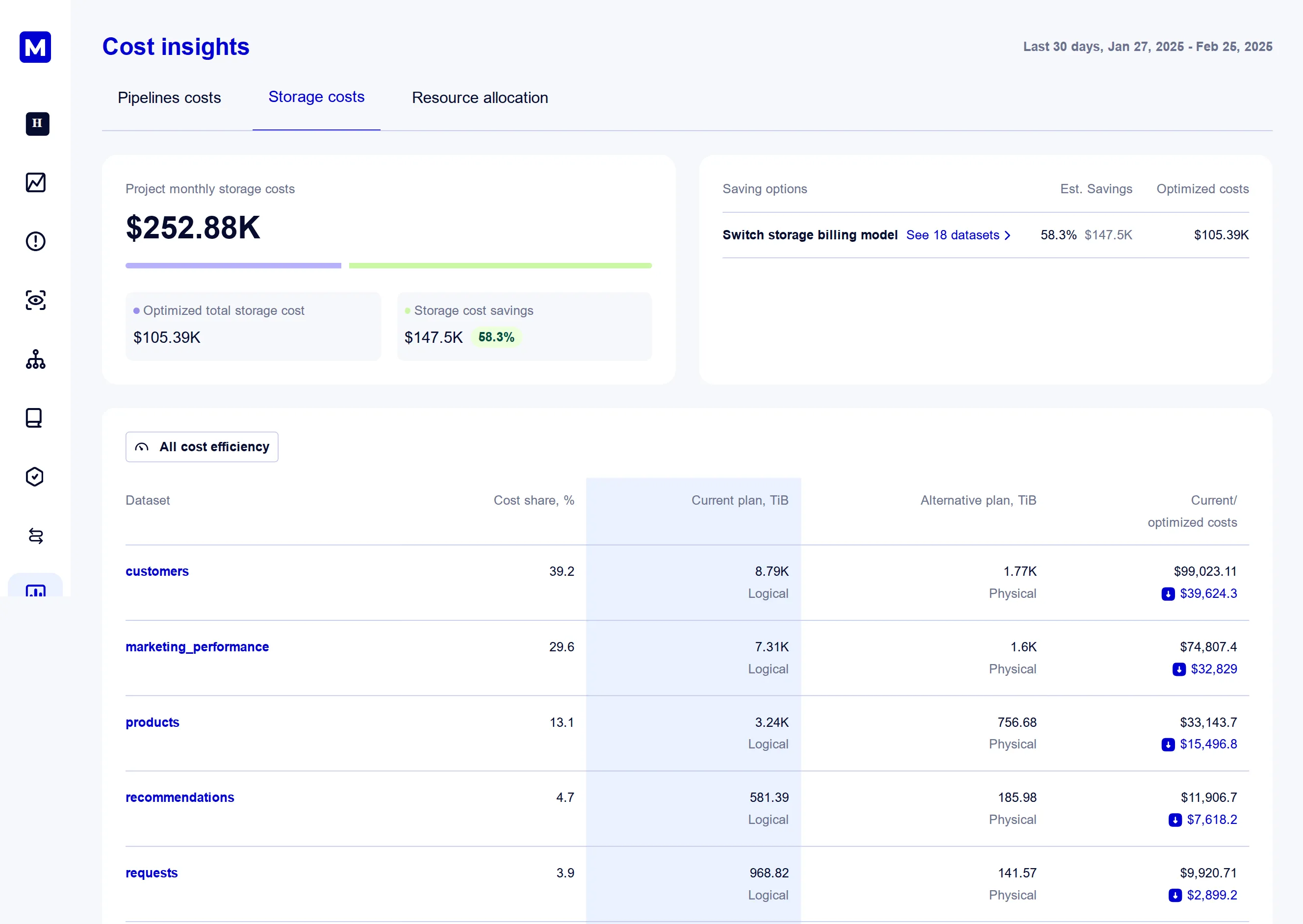
Storage Cost Insights page shows the details of the aggregated estimated metrics per dataset:
Masthead analyses each of these parameters and offers a set of recommendations optimizing the total storage bill.
BigQuery provides logical and physical storage billing models. These models offer the flexibility to select costs based on data properties and operation patterns. Masthead analyzes dataset metadata and storage usage to estimate the optimal cost for each billing model.
Google Cloud Billing calculates the storage cost in the following way:
active_logical_storage_size * active_logical_storage_price + long_term_logical_storage_size * long_term_logical_storage_price(active_physical_storage_size + time_travel_physical_storage_size + fail_safe_physical_storage_size) * active_physical_storage_price + long_term_physical_storage_size * long_term_physical_storage_priceMasthead analyzes your data storage usage retrospectively and, using information about the alternative costs of each billing model, creates a recommendation for opportunities where the switch provides a consistent and confident saving outcome.
You can adjust the dataset configuration by running a DDL statement:
ALTER SCHEMA PROJECT.DATASET SET OPTIONS( storage_billing_model = LOGICAL or PHYSICAL);Run optimizations using a notebook
Use a notebook example to apply recommendations across all your datasets.
By analyzing BigQuery lineage end-to-end Masthead identifies the tables that are being regularly updated, but have no downstream consumption.
Masthead applies the Dead-end label to the following resources:
You can explore complete lineage with Dead-end labels by opening a Lineage page for a corresponding table or pipeline.
Run optimizations using a notebook
Use this notebook example to apply recommendations across all your tables.
Dead-end. The Dictionary page lists all dead-end tables.Masthead helps you track the costs of data assets that aren’t in active use by labeling those tables as Unused. Based on your lineage, these tables have had no upstream or downstream consumption for 30 days, which is the default period.
Unused. The Dictionary page lists all unused tables.