
Release Notes
October 22, 2026 - BigQuery projects by folder
Section titled “October 22, 2026 - BigQuery projects by folder”See your connected BigQuery projects the way you organize them in Google Cloud. The BigQuery integration page and the Select projects window now group projects into folders and show which permissions each project lacks.
- Folder tree: Browse projects in expandable folders, and select or clear a whole folder in the Select projects window.
- Permissions at a glance: See which permissions each project, and each folder, is missing.
- Status and dates: See each project’s status and the date you added it.
Review your projects on the BigQuery integration page or read the BigQuery documentation for details.
October 19, 2026 - incident settings
Section titled “October 19, 2026 - incident settings”Reduce incident noise for your whole workspace. The new Incident settings page lets you space out repeated notifications and skip small pipeline volume anomalies.
- Time between notifications: Choose how often Masthead notifies you about repeated incidents of each type.
- Pipeline volume threshold: Skip pipeline volume incidents below a minimum slot time or billed bytes.
- Owner-only changes: Only workspace owners can change these settings.
Default values keep the current behavior. To get started, open the Incident settings page or read the account settings documentation for details.
October 15, 2026 - capacity commitments
Section titled “October 15, 2026 - capacity commitments”Check whether you pay for BigQuery slots that your workloads don’t use. Masthead now shows your capacity commitments next to your reservations, so you can see how much of the committed slot capacity is in use.
- Commitments section: The Costs Overview page lists your capacity commitment groups below Reservations. The section is hidden when you have no commitments.
- Commitment group page: Compare each reservation’s used, lent, and unused baseline, and the unassigned commitment, against your committed slots in a daily chart.
- Cleaner reservation list: Reservations with zero baseline slots no longer appear in the list.
Review your commitments on the Costs Overview page.
October 14, 2026 - interval and breakdown views for compute costs
Section titled “October 14, 2026 - interval and breakdown views for compute costs”See what drives your compute spend over the period that matters to you. The Compute costs widget on the Costs Overview page now lets you change the interval and the breakdown of its charts.
- Interval: View both charts by day, week, or month.
- Cost breakdown: Switch the Daily cost chart between General, Compute cost, and Savings views. Compute cost shows cost per compute model and edition. Savings separates Dead-End savings from Switch Model savings.
Review your costs on the Costs Overview page or read the Compute costs documentation.
October 8, 2026 - bulk incident updates
Section titled “October 8, 2026 - bulk incident updates”Resolve a wave of related incidents in one step instead of editing them one by one.
- Bulk actions: Select several incidents, or all incidents on the page, and change their status, severity, or assignee, or add a note. You can append a note to existing notes or replace them.
To get started, select incidents on the Incidents page.
October 5, 2026 - custom data scans with AI agents
Section titled “October 5, 2026 - custom data scans with AI agents”Custom data scans monitor the metrics that matter to your team, such as null rates, row counts, or daily costs, next to the checks Masthead runs on its own. You describe a metric to your AI agent, the agent publishes it as a BigQuery table that a scheduled query keeps current and creates the scan, and Masthead raises a data quality incident when a value falls outside its expected range.
- Agent-guided setup: The
masthead-data-scansskill in the Masthead agent tools plugin helps you write the metric query and checks it with your credentials. After you confirm each step, it creates themasthead_dqdataset, the table, its scheduled refresh, and the grant, and then creates the scan. - Metrics, not rows: The scan table holds aggregated values per table, metric, and period. Masthead reads only that dataset, never your table rows.
- Expected ranges and missing data: Masthead learns the expected range of every metric and flags values outside it and periods without data. Masthead checks a period only after it closes and a processing delay passes, so late data can arrive.
- Immediate first run: The first run starts as soon as you create a scan and analyzes the last 14 days without sending notifications. Later anomalies follow your alert settings.
- MCP tools: Agents create, list, update, and delete scans with the data scan tools. A dry run validates the table before Masthead creates the scan.
- Data scans tab: The Data Quality page lists every data scan with its latest result. Each scan’s page shows results per period, metric values against their expected ranges, the scan configuration, and the monitored tables. Dataplex scans move to their own tab.
- Scan queries on Masthead: Masthead pays for the queries that read the scan table.
Custom data scans are available in the US region.
To create your first scan, follow the data scans skill guide or read the custom data scans documentation. Review your scans on the Data Quality page.
September 9, 2026 - Masthead agent tools
Section titled “September 9, 2026 - Masthead agent tools”Masthead ships a set of pre-built skills that let AI coding agents triage incidents and audit BigQuery spend against your Masthead data. The skills run in Claude Code, OpenAI Codex, and other agentic harnesses, and include the Masthead MCP server connection, so an agent reads your incidents, lineage, and cost recommendations directly.
- One plugin: The
masthead-agent-toolsplugin in the for-agents repository bundles the skills, commands, and the MCP server connection. - Incident triage: The triage workflow collects open incidents, traces lineage and blast radius, and drafts a mitigation plan.
- FinOps audit: The savings workflow reviews cost optimization opportunities across multiple categories and suggests actions to apply to realize them. The skills prepare a set of required code artifacts or reports for you to review.
Click Agent tools in the Masthead app to copy a setup prompt that walks your agent through installation and MCP sign-in.
Follow the AI agent skills guide or review the MCP tools reference.
September 8, 2026 - reservation recommendations by principal
Section titled “September 8, 2026 - reservation recommendations by principal”Masthead recommends moving each principal’s workload to a cheaper BigQuery reservation or to on-demand compute, and generates the assignment configuration for you. A recommendations widget on the Principals tab ranks principals by potential savings, and each recommendation has a dedicated page with the reassignment details.
Review principal recommendations on the Workload / Principals page and follow the Reservation Assignments guide.
September 2, 2026 - compute cost attribution by principal
Section titled “September 2, 2026 - compute cost attribution by principal”Workload gets a Principals tab that attributes BigQuery compute cost and potential savings to the identity that ran a job, whether a service account or a user. Use it to find which automated principals drive spend and where a billing-model change pays off.
Open the Principals tab on the Workload / Principals page.
August 14, 2026 - reservation recommendations for individual models
Section titled “August 14, 2026 - reservation recommendations for individual models”Masthead recommends the most cost-effective BigQuery compute model for each individual data model, with an assignment configuration ready to apply.
Review model recommendations on the Workload / Models page and follow the Reservation Assignments guide.
August 3, 2026 - data quality scan severity and incident context
Section titled “August 3, 2026 - data quality scan severity and incident context”Custom data quality scans carry a severity, and incidents show the scan that triggered them. You can judge how urgent a data quality failure is without leaving the incident.
Review scan results on the Data Quality page or read the data quality scans documentation.
July 28, 2026 - incident origin data products, notes, and user roles
Section titled “July 28, 2026 - incident origin data products, notes, and user roles”Incident triage gains product context and loses clicks, and you can change an incident assignee in the overview list.
Open the Incidents page.
July 24, 2026 - rebuilt data dictionary
Section titled “July 24, 2026 - rebuilt data dictionary”Masthead rebuilt the Dictionary for speed and clarity. The datasets list loads faster on large warehouses, and the table details page shows total cost and a dead-end indicator alongside schema and lineage.
Browse your tables on the Dictionary page.
July 23, 2026 - BigQuery reservation monitoring
Section titled “July 23, 2026 - BigQuery reservation monitoring”A new Reservation page tracks how your BigQuery slot capacity is used over time. Compare provisioned capacity against actual slot consumption for each reservation to find over- and under-provisioning before it reaches the bill.
Open a reservation from the Reservation tab in Cost Insights.
July 14, 2026 - configurable pipeline cost columns and pipeline error context
Section titled “July 14, 2026 - configurable pipeline cost columns and pipeline error context”The Pipelines tab on the Workload page becomes a table you configure, and pipeline details show recent run failures next to cost and lineage.
- Configurable columns: Choose which cost and usage columns the Pipelines list shows, and reorder them. Configurations are saved per user.
- Pipeline error widget: The pipeline view shows the most recent error message for a pipeline. You can still see the detailed retrospective in the Incidents page.
Open the Pipelines tab on the Workload page or read the pipeline and model observability guide.
July 1, 2026 - lineage for shared datasets and Looker explores
Section titled “July 1, 2026 - lineage for shared datasets and Looker explores”The Lineage graph shows cross-project dataset sharing and drills into Looker down to the explore.
- Linked dataset nodes: The graph renders shared datasets, the tables, views, materialized views, external tables, and routines inside them, and their external consumers as distinct node types.
- Looker explores: A Looker dashboard node lists its explores, and edges connect BigQuery tables to the explores that read them.
- Rebuilt graph: The Lineage page and the lineage widgets embedded in incident, data asset, and pipeline views share a more performant renderer and asset search.
Open the Lineage page or read the lineage documentation.
June 30, 2026 - expanded data stack coverage
Section titled “June 30, 2026 - expanded data stack coverage”Masthead expands the data stack of BI services and ETL/ELT tools:
- New technologies: Masthead detects Monte Carlo, Qlik, Terraform, Kestra, Confluent, Zapier, n8n, Boomi, and Claude.
Review detected technologies on the Lineage page or read the lineage documentation.
June 25, 2026 - expanded incident statuses, severities, and filters
Section titled “June 25, 2026 - expanded incident statuses, severities, and filters”Incidents carry a wider set of statuses and severities, and the incidents table filters are rebuilt.
- More statuses and severities: The incident status set is expanded with added severities.
- Data quality preview: Incident list shows a sparkline preview for data quality and Dataplex incidents.
Open the Incidents page.
April 30, 2026 - Dataplex data quality monitoring
Section titled “April 30, 2026 - Dataplex data quality monitoring”Masthead surfaces Google Cloud Dataplex data quality scans alongside its own checks.
- Scans widget: The Monitors page shows a Dataplex widget with each scan, its rules, and its latest results.
- Dataplex incidents: Incident filters and labels distinguish Dataplex data quality incidents, and incident rows show a data quality sparkline.
Connect Dataplex from the Integrations page or read the Dataplex integration guide.
April 7, 2026 - BI assets in data products and the dictionary
Section titled “April 7, 2026 - BI assets in data products and the dictionary”Looker dashboards and looks are assets you attach to a data product, and they appear in the Dictionary next to BigQuery tables.
- Data product BI assets: When you create or edit a data product, add Looker dashboards and looks alongside datasets and tables.
- Dictionary BI dashboards: The Dictionary lists BI dashboards with their upstream tables, and search matches dashboard names and elements.
Open the Data Products page or read the data products documentation.
March 25, 2026 - redesigned incident details page
Section titled “March 25, 2026 - redesigned incident details page”The incident details page is rebuilt with a clearer layout, and updated freshness and volume charts.
- Dedicated URL: Each incident has its own address, so you can link a teammate straight to it.
- Reworked layout: The details, history, and contributing pipelines widgets, and pagination and search on the incidents list.
Open the Incidents page.
March 12, 2026 - Looker Studio and Google Sheets as pipeline destinations
Section titled “March 12, 2026 - Looker Studio and Google Sheets as pipeline destinations”Masthead recognizes Looker Studio reports and Google Sheets as data destinations in Pipelines, Cost Insights, and the Lineage graph.
- Destination detection: Jobs that export to Looker Studio or Google Sheets show the destination type in pipeline and cost tables.
- Lineage nodes: The Lineage graph renders Looker Studio and spreadsheet nodes.
Review destinations on the Pipelines tab of the Workload page.
February 24, 2026 - compute model switch recommendations
Section titled “February 24, 2026 - compute model switch recommendations”The compute savings view recommends switching a workload to a cheaper BigQuery pricing model and shows the simulated cost of the cheapest model.
- Simulated cheapest model: Each workload shows its current compute cost next to the cost under the cheapest on-demand or Editions model alternative.
- Apply from a recommendation: A recommendation shows how to create a new reservation assignment or adjust an existing one, depending on the workload’s current reservation.
Review recommendations on the Workload page and follow the Reservation Assignments guide.
February 13, 2026 - GCP integrations verification and reconnect
Section titled “February 13, 2026 - GCP integrations verification and reconnect”To re-authorize a connected GCP project or check its access - use the Integrations page.
- Verify access: The integrations check and list the required resources and highlight any issues.
- Reconnect flow: To update roles on an existing project - use the reconnect action in the connected projects list.
Open the Integrations page or read the BigQuery integration guide.
February 11, 2026 - advanced Looker lineage
Section titled “February 11, 2026 - advanced Looker lineage”Masthead now provides automated upstream-to-BI lineage, creating a complete observability path from BigQuery tables to Looker business logic. We track actual data flow rather than relying on static LookML analysis, ensuring lineage stays in sync with real usage.
-
Cost Attribution: Precisely pin BigQuery costs, bridging Google Cloud billing and Looker assets.
-
Impact Analysis: Automatically discover which Looker Dashboards and Explores depend on specific BigQuery tables to prevent breaking changes. Get instant stakeholder notifications when data incidents affect business-critical BI content.
-
Usage & Optimization: Differentiate production (Dashboards) from exploration (Ad-hoc) spend to highlight where inefficient logic originates. Identify orphaned or high-intensity BI assets to prioritize LookML and storage improvements.
Connect your Looker to start.
June 30, 2025 - dead-end pipelines
Section titled “June 30, 2025 - dead-end pipelines”Masthead highlights the upstream pipelines that only produce “Dead-End Tables” - tables that have no downstream consumption.
.CA-MgVyZ_Z1rDkTt.webp)
What this offers for you:
- Identify Waste: Easily pinpoint upstream pipelines that produce only these unconsumed tables.
- Reclaim Resources: Quickly review and switch off unnecessary pipelines to save on compute, storage, and operational costs.
- Boost Efficiency: Streamline your data ecosystem by removing unused assets and improving overall data governance.
Get Started: Check for “Dead-end pipelines” savings available on Compute Costs to identify reclaimable resources. And keep an eye for “Dead-End” tags in your Lineage view .
April 10, 2025 - data products and data domains
Section titled “April 10, 2025 - data products and data domains”Masthead helps you better organize, govern, and manage your data with Data Products and Data Domains.
What’s New?
- Data Products: Treat your key data assets like first-class products. Group related datasets and tables into a single, manageable entity (for example, “Finance Core Metrics” or “User Activity”). This allows you to:
- Monitor aggregated costs (compute, storage).
- Track usage, subscribers, and associated incidents.
- Improve operational governance and get more context.
- Data Domains: Introduce high-level categorization for your Data Products (for example, Finance, Marketing, or Product). Domains help you:
- Organize products logically by business area or team.
- Assign clear ownership via responsible team emails.
- Route relevant communications via dedicated Slack channels.
- View rolled-up cost and incident metrics per domain.
- Manage as Code with Terraform. Alongside these features, we’re launching Masthead Terraform provider. Now you can define, manage, and version your Data Products and Data Domains declaratively using Infrastructure as Code. Automate your data governance setup, ensure consistency, and integrate with existing CI/CD pipelines in your data platform.
Why it Matters:
These features provide a robust framework for treating data strategically within your organization. Improve organization, enhance governance, gain better cost and reliability visibility, and streamline management through automation.
Get Started:
- Explore the new Data Products section in the Masthead UI.
- Check out the documentation for Data Products, Domains and the Terraform Provider.
We believe these additions will significantly improve how you manage and leverage data in your teams.
April 9, 2025 - transitioning to standard BigQuery metadata roles
Section titled “April 9, 2025 - transitioning to standard BigQuery metadata roles”To enhance security and provide deeper insights into modern BigQuery features, Masthead is updating its Google Cloud integration. We are transitioning from custom IAM roles to standard Google Cloud roles, namely BigQuery Metadata Viewer and BigQuery Resource Viewer.
Why the Change?
- Improved Security: Standard roles grant access only to configuration metadata, ensuring your underlying data and compute resources remain inaccessible to Masthead.
- Enhanced Visibility: Allows Masthead’s log-based analysis to provide you transparency into all the modern BigQuery capabilities like Routines, Models, Reservations, and Commitments.
- Standardization: Aligns Masthead integration with Google Cloud best practices for secure metadata exchange.
This new configuration is applied to all the new customers moving forward. See which resources are used in the integration.
Actions Required for Existing Customers:
To benefit from these improvements, we’ll reach out with more information to update your existing Masthead integration. We are providing two options there:
- OAuth Integration: You can update configuration via the UI in a one-click OAuth process to re-authorize with the new roles.
- Terraform Integration: Update to the latest version of our Terraform module and re-apply your configuration.
February 25, 2025 - storage cost insights
Section titled “February 25, 2025 - storage cost insights”We’re excited to introduce Storage Cost Insights, a new feature in Masthead that helps to get an overview and optimize BigQuery storage costs. Masthead now analyzes BigQuery metadata and usage logs to estimate storage costs and provides actionable recommendations to reduce spending.
Key facts:
- Aggregated Storage Cost Metrics: View estimated storage size and cost per dataset.
- Actionable Billing Model Recommendations: Masthead evaluates both Logical and Physical storage billing models to suggest the most cost-effective option for each dataset. Easily identify datasets where switching billing models can lead to consistent cost savings.
- Simple Implementation: Apply recommended changes using a one-line DDL statement:
When you need to switch a dataset to logical storage billing model:
ALTER SCHEMA my_dataset SET OPTIONS(storage_billing_model = "LOGICAL")or to physical:
ALTER SCHEMA my_dataset SET OPTIONS(storage_billing_model = "PHYSICAL")- Impact Awareness: Changing a dataset’s billing model takes effect after 24 hours.
Review storage cost recommendations in the Storage Cost Insights page and apply the suggested optimizations to reduce storage expenses.
January 27, 2025 - data quality analysis with custom scans
Section titled “January 27, 2025 - data quality analysis with custom scans”Masthead’s new Data Quality anomalies detection with custom scans combines several key advantages: it requires minimal effort to set up, allowing you to quickly implement tailored quality monitoring that reflects your unique business needs. This approach is designed to identify any data issues before they impact your operations.
The solution automatically organizes and monitors your scans results, handling the heavy lifting of data synchronization and analysis. This streamlined automation eliminates the need for granular configuration, letting you focus on core business activities rather than intricate setup details.
Seamlessly integrating into your workflow, the feature strikes an optimal balance between simplicity and robust data validation. It’s the go-to option for teams seeking an efficient, hassle-free solution to maintain high data quality without compromising on performance.
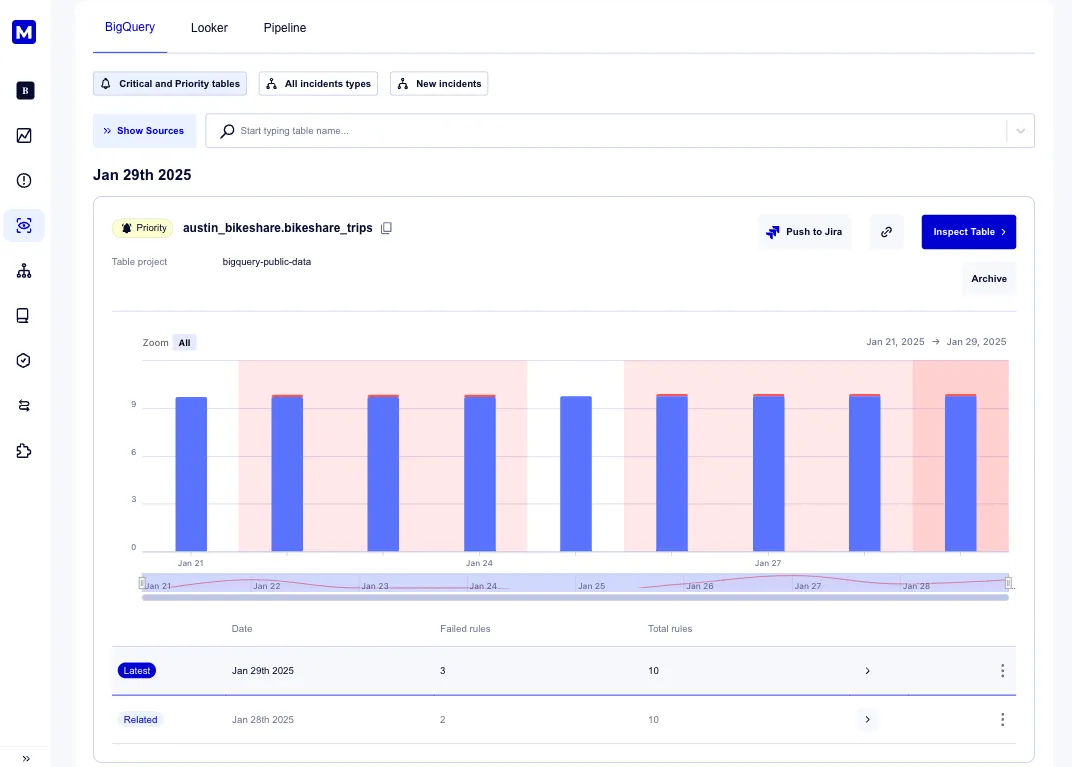
Compared to data quality feature in Google Dataplex, our approach delivers a more familiar, non-intrusive experience with minimal setup and transparent cost, providing highly tailored insights that effortlessly fit into your operational flow.
Enjoy peace of mind with a non-intrusive, metadata-driven approach to data quality that keeps your operations running smoothly and reliably.
Get started by integrating your custom data scans with Masthead’s anomaly detection.
October 9, 2023 - Looker dashboards
Section titled “October 9, 2023 - Looker dashboards”Masthead Data is excited to introduce a new feature designed specifically for BI specialists who work with Looker. Starting today, you can prioritize specific Looker dashboards in Masthead, ensuring that BI engineers receive notifications solely about selected dashboards. This feature reduces the number of alerts for unrelated anomalies and errors, allowing users to focus only on those that impact Looker dashboards or reports.
Additionally, we’ve provided the ability to categorize Looker dashboards as “priority,” “regular,” or “muted.” This ensures that BI engineers remain focused on what matters most.
You can now view a comprehensive list of Looker dashboards affected by anomalies or errors within a notification. Alternatively, you can explore these connections and gather detailed insights in the Data Lineage. We have added Looker, which helps visually to understand Google BigQuery and Looker dependencies.
With this update, BI specialists can:
- Receive immediate notifications when a top-priority Looker dashboard is down or experiences an anomaly.
- Consolidate all affected dashboard elements in one location, making it simpler to identify erroneous data sources and affected data consumers.
- Focus solely on Looker dashboards and reports, avoiding notifications related to other data system failures.
How do the Looker incidents work?
Ensure that Looker is connected to Masthead. If Google BigQuery sources any of the dashboards in Looker, any anomaly related to BigQuery tables that affects those Looker dashboards will be displayed in the “incidents” tab (Looker).
The incident will include a list of all dashboards affected by a particular anomaly, enabling users to assess the implications and address the issue comprehensively.
How does the Looker Dictionary work?
The Data Dictionary now contains a list of all dashboards available in the connected Looker. This simplifies the understanding of data sources and the dashboard elements in use.
This provides a comprehensive view of dashboards, or data products if you prefer, used within the organization. It includes links to the actual Looker dashboards, a list of dashboard elements, a list of Google BigQuery tables, as well as their creation and last update dates.
The Looker Dictionary is also designed to simplify searches. Users can search by dashboard name, dashboard ID, dashboard element, or any source table upstream for a Looker dashboard.
July 30, 2023 - Looker dictionary
Section titled “July 30, 2023 - Looker dictionary”Masthead Data introduces Looker Dictionary, empowering you to spot issues in your Looker dashboards before they reach data end-customers. Gain full visibility into your data products and know how anomalies in pipelines and tables affect business users in Looker dashboards. This update enables smart searches by dashboard IDs, look names, look IDs, dashboard elements, or upstream tables, which simplifies management of Looker assets.
With this new feature, you can review the type of your Looker data product (whether it’s a look or dashboard), its core elements, owner, the upstream tables used, as well as its creation and update history of the dashboards.
You can also reach any of your Looker dashboards by just clicking on its ID in the Masthead Looker dictionary.
Dictionary for Looker helps you to:
- Get alerts about errors and anomalies that may impact your Looker dashboards long before they ever reach your customers, which is especially critical for BI engineers.
- Manage Looker entities in a single space. Know how many Dashboards and Looks are in Looker, when they were created and last updated, who is the owner.
- Run a fast and intuitive search for your critical Looker asset.
How does this feature work?
Once you connect Looker, go to the “Dictionary” tab and choose “Looker Dictionary.”
Masthead displays you a full list of your Looker assets, supported with interactive search options, critical information on your data products, and an opportunity to review all upstream tables affecting your dashboards.
Note that Masthead Data is a non-intrusive data observability solution that processes only metadata without accessing the actual data in your Looker.
May 27, 2023 - query optimizer
Section titled “May 27, 2023 - query optimizer”Masthead Data has recently introduced a new feature that enables you to optimize your SQL queries using OpenAI GPT. With this latest update, you now have the option to select any query captured by Masthead and utilize the AI Optimizer to receive recommendations on how to improve it.
With this feature you can:
- Enhance the effectiveness of your SQL queries by following best practices recommended by the world’s foremost AI agent.
- Reduce the cost of your SQL queries by improving their overall quality.
- Receive valuable recommendations that may help you refine your query-writing approach.
The AI Optimizer ensures that your table contents remain private and are not shared with the AI agent. It only shares metadata with OpenAI to enhance the query-writing capabilities of GPT.
How does this feature work?
Select any SQL query from the “Compute Costs” tab and review it. If you wish to improve this query, simply click the “AI Optimizer” button.
Masthead sends a request to OpenAI GPT and provides you with a response containing a recommendation for enhancing the query. It is entirely up to you to decide whether to use the recommended query.
Note that Masthead Data cannot guarantee the accuracy of the output in every instance. Hence, we strongly advise you to thoroughly review the recommended query before executing it.
April 27, 2023 - column data lineage
Section titled “April 27, 2023 - column data lineage”Masthead Data has just released an update to its data lineage feature, allowing you to gain the most comprehensive insight into your data. Going forward, you’ll be able to see the connections between your data tables down to the smallest details of each table column. By highlighting related columns across different tables, Masthead enables you to understand how each column affects downstream data.
With this update, you get:
- Opportunity to dig deep into your data tables and pinpoint the exact connections between them
- Ability to identify and track the root cause of data anomalies affecting your tables all the way down to the specific table column
- Complete and clear observability of your data flows and connections down to reports in Looker
How does this feature work?
While checking your data lineage, click the number of columns in a table in the Lineage tab.
You will visualize your table column dependencies and see how each of your table columns affects related columns across different tables.
April 14, 2023 - integration with Looker
Section titled “April 14, 2023 - integration with Looker”Masthead Data offers you complete control over the quality of your Looker’s data visualizations and dashboards. No one is immune to bad data, which can quickly spread and impact the quality of downstream tables that Looker dashboards rely on. By integrating Masthead with Looker, you can quickly identify reports and dashboards affected by data anomalies and easily visualize the root cause of the problem with data lineage.
This update provides you with the following benefits:
- Complete control over the quality and reliability of your Looker reports and dashboards
- Clear view of the interactions between tables sourcing Looker reports, allowing you to effortlessly trace the data path throughout the platform
- Ability to identify and track down to the root cause any anomalies that affect your Looker reports and dashboards
How does this feature work?
Follow the instructions to create Looker configurations and allow Masthead to observe your Looker dashboards and real-time reports.
Visualize your table dependencies with data lineage to see how bad data spreads across your data tables and identify Looker reports and dashboards affected by the data anomaly.
March 30, 2023 - in-depth Cloud cost tracking. beta
Section titled “March 30, 2023 - in-depth Cloud cost tracking. beta”Masthead Data introduces advanced functionality for managing your BigQuery fees. Normally, BigQuery only shows the total cost of using the cloud service, without any information on how individual pipelines and queries contribute to this fee. However, with our latest update, you can easily track the cost of each pipeline and query, giving you complete control over your pricing dynamics. Our new feature includes the following benefits:
- Full control and analytics over the cost of your data pipeline
- The ability to track the frequency, average memory/slot consumption, average cost, and total cost of your query requests for both BigQuery On-demand and Flat-rate pricing models
- Cloud cost consumption tracking for database services and tools such as Looker, Fivetran, dbt, and Dataform
- The ability to view the price and cloud resource consumption dynamics for different query requests and pipelines within a set timeframe.
How does this feature work?
When you onboard to Masthead, define your BigQuery pricing model.
Indicate the region where your data centers are located and see the price you pay for a terabyte of cloud resource or 100 slots of cloud compute power, depending on your commitment plan.
With our new feature, you will get a detailed overview of TB or slots consumed for running your pipeline, as well as detailed analytics on your cloud resource consumption and pricing dynamics. Here you can also check how additional database tools and services, such as dbt, contribute to your cloud cost.
With our latest feature, you’ll get a detailed breakdown of how much cloud resource you’re consuming or how many slots you’re using, and in-depth analytics on your consumption and pricing trends. You can even see how additional database tools and services, like dbt, are impacting your cloud cost.
If you want to review the pricing dynamics of individual queries, you can easily do that too. If you’re using an On-demand BigQuery pricing plan, Masthead will show you the query’s frequency and time, average memory usage in terabytes, average cost per terabyte, and total cost. For Flat-rate BigQuery subscribers, you’ll see an overview of the query’s frequency and time, the number of slots required to run it, average cost per slot, and total cost.
On top of that, you are able to check the query and its lineage of your pipeline.
With Masthead’s detailed analytics and breakdowns of your cloud resource consumption and pricing, you can stay on top of your cloud cost. By identifying which pipelines and queries are consuming the most resources and cost, you can make informed decisions and optimize your usage to pay less and save money.
December 26, 2022 - lineage improvements
Section titled “December 26, 2022 - lineage improvements”Effective data governance is critical for making informed and reliable decisions. As data engineers handle vast amounts of data at high speeds, it is crucial to have a clear understanding of the origin and transformation of the data. This is where data lineage comes in ”“ it helps to ensure that the data being used is trustworthy, accurately transformed, and stored in the correct location. By tracking the lineage of data, organizations can ensure that strategic decisions are based on high-quality data.
We are excited to announce an update to our data lineage:
- Visual enhancements to help identify data assets that have been impacted by anomalies or errors.
- Users can now view the type of every field within the data lineage, providing greater clarity and detail in the tracking of data transformation.
Masthead Lineage feature now includes visual highlighting to clearly identify tables that have been impacted by data anomalies or errors. Grey highlighting is also used to show downstream tables or views that may be affected by these errors.
In addition, we have carefully evaluated the color contrast of our Masthead UI and data lineage tools to ensure they meet accessibility standards outlined in the Web Content Accessibility Guidelines (WCAG). This includes considerations for individuals with color blindness, making our platform more inclusive for all users.
The Masthead Lineage now provides types of data in column-level lineage, allowing data engineers quickly see the types of data within each column.
This level of granularity is crucial for understanding the transformation and flow of data and its use downstream.
November 14, 2022 - Jira integration
Section titled “November 14, 2022 - Jira integration”Masthead takes a solid step towards more efficient issue management. From now on, you can immediately find people associated with the detected data errors and collaborate to solve data issues faster. Jira integration enables:
- More control over issue detection and solution process.
- More convenient interface for data teams responsible for data processing.
See Jira Integration on how this feature works.